The Carmen Canvas extension, made by a Buckeye.
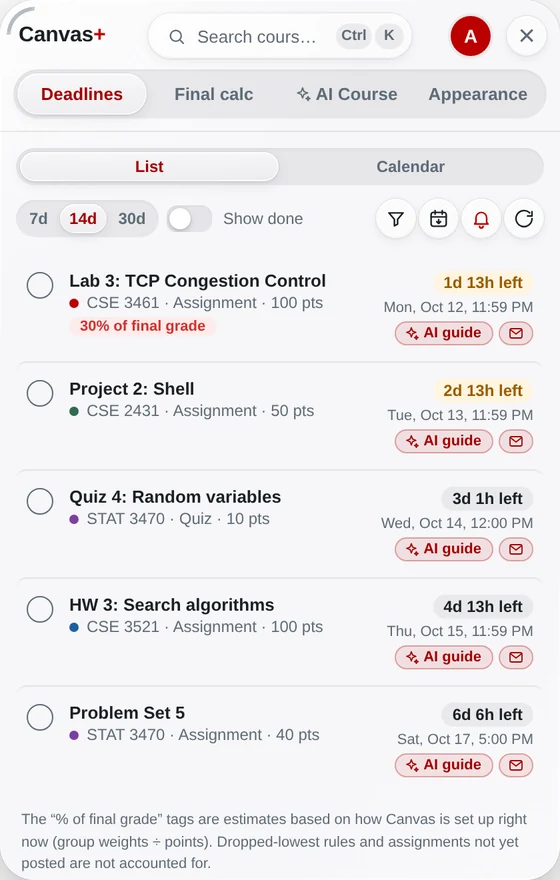
Canvas+ works on Carmen out of the box — no setup, no school code. Built by an Ohio State student who wanted Carmen to show what’s due, what’s worth what, and what you need on the final.
Add to Chrome — freeFree · Chrome & Edge · works with any school on Canvas
How it works
Add Canvas+ to Chrome
Free. Works on Chrome and Edge.
Open Carmen
Go to carmen.osu.edu and sign in as usual — Canvas+ never asks for your password.
Click the Canvas+ tab
It’s on the right edge of every Carmen page (or press ⌘K / Ctrl+K).
What you get
Every deadline, one list
All your courses, sorted by due date, with reminders. More →
What you need on the final
From your real weights in Carmen or the syllabus. More →
GPA on your scale
Cumulative and this term’s projection. More →
Dark mode & course files
A real dark mode, and every course file in one .zip. Dark mode → · Files →
Questions
Does Canvas+ work on Carmen?
Yes. Carmen is Ohio State’s Canvas, and Canvas+ works on it right away.
Is it safe to use with my OSU account?
Canvas+ reads Carmen with your own session in your browser. It never sees your password or Duo, never submits work and never changes grades.
Is Canvas+ made by Ohio State?
No. Canvas+ is an independent project by an Ohio State student, not affiliated with or endorsed by The Ohio State University.
Try it on your own Canvas.
Free. Sign in with Google or an e-mail code — no password. Your grades never leave your browser.
Add Canvas+ to Chrome