Canvas assignment reminders that actually remind you.
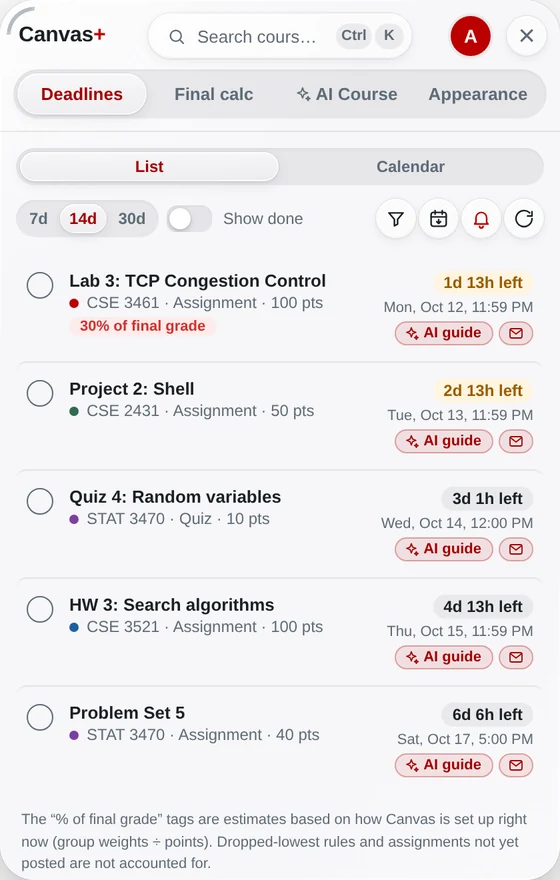
Every assignment, quiz and discussion from all your courses in one list, sorted by due date — and a notification before each one is due, even when Canvas is closed.
Add to Chrome — freeFree · Chrome & Edge · works with any school on Canvas
How it works
Add Canvas+ to Chrome
Free. Sign in once and your deadlines appear — no setup.
Open Deadlines
Click the Canvas+ tab on the right edge of Canvas (or press ⌘K / Ctrl+K). Everything due is in one list.
Tap the bell
Allow notifications and choose when to be reminded — 24 hours and/or 2 hours before.
What you get
One list for every course
Sorted by due date with a live countdown and how much of your grade each item is worth.
More than due dates
Get a notification when a grade is posted, when an instructor moves a deadline, or posts an announcement.
Exams too
Exam dates from your syllabi, with reminders 3 days and 1 day before.
Your calendar, your to-do
Export deadlines to Google / Apple Calendar, and tick items off — synced with Canvas To Do. The calendar export is open source.
Questions
Does Canvas send assignment reminders?
Canvas’s notification settings mostly tell you about changes, course by course. Canvas+ adds a desktop reminder shortly before each deadline, for every course in one place.
Do I need Canvas open?
No. Reminders come as Chrome notifications while Chrome is running.
Is it free?
Yes. Deadlines, reminders, grade alerts and calendar export are free forever.
Try it on your own Canvas.
Free. Sign in with Google or an e-mail code — no password. Your grades never leave your browser.
Add Canvas+ to Chrome