Canvas final grade calculator: what do I need on my final?
Pick the grade you want, and Canvas+ shows the exact score you need on the final — worked out from your own grades and your course’s real weights, right inside Canvas.
Add to Chrome — freeFree · Chrome & Edge · works with any school on Canvas
How it works
Add Canvas+ to Chrome
It’s free and takes ten seconds — sign in with Google or an e-mail code, no password.
Open Final calc
On any Canvas page, click the Canvas+ tab on the right edge (or press ⌘K / Ctrl+K) and choose Final calc.
Pick a course and a target
Choose A, B or any letter — you see the score you need on the final, and how much of the course is already graded.
What you get
Real weights, not guesses
Uses the assignment-group weights from Canvas. No weights in Canvas? It reads the grade breakdown from the syllabus — and you can edit any weight. The grade math is open source on GitHub.
Your course’s letter cut-offs
Letters follow the grading scheme in Canvas when the course has one, or a common scale — or your own.
Extra credit counts
Extra credit is added on top, the way most syllabi describe it.
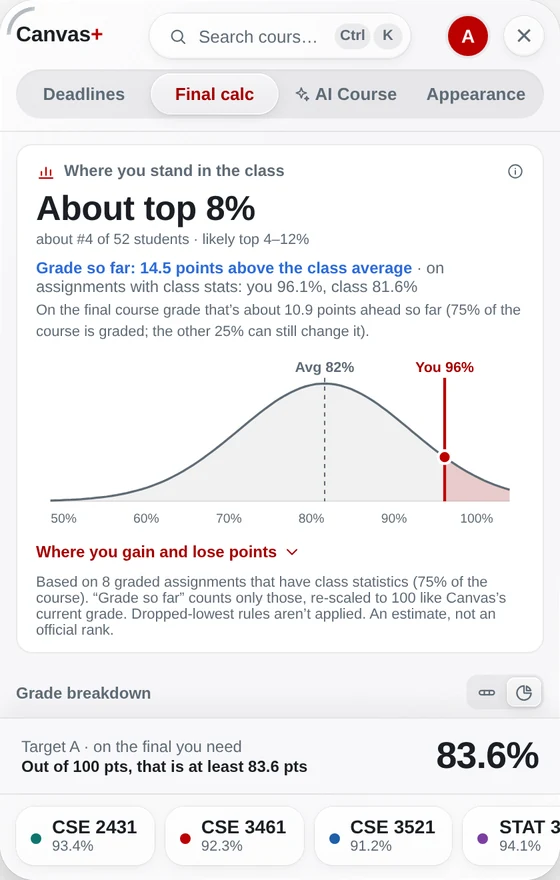
Where you stand in the class
When your instructor shares class statistics, see roughly where you rank and where you gain or lose points.
Questions
Is the Canvas final grade calculator free?
Yes. The final grade calculator, GPA and grade alerts are free forever — only extra AI uses are paid.
Does it work if my course has no weights in Canvas?
Yes. Canvas+ looks for the grade breakdown in the syllabus, and you can also type the weights yourself.
Is the result exact?
It is exact for the weights and grades it uses. Dropped-lowest rules are approximated and curves aren’t included, so check your syllabus for those.
Try it on your own Canvas.
Free. Sign in with Google or an e-mail code — no password. Your grades never leave your browser.
Add Canvas+ to Chrome