Canvas GPA calculator: your GPA, straight from Canvas.
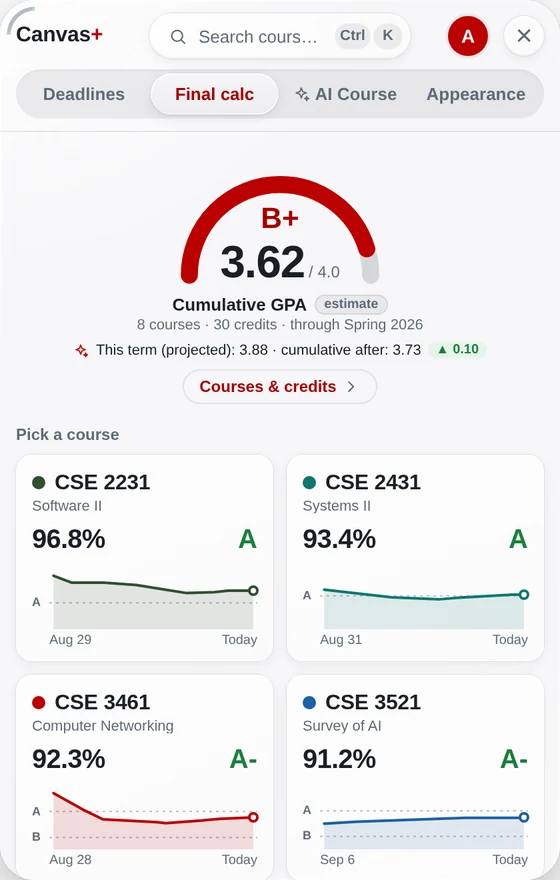
Canvas+ reads your final grades and current grades in Canvas and works out your cumulative GPA and this term’s projection — no spreadsheet, no typing in every course.
Add to Chrome — freeFree · Chrome & Edge · works with any school on Canvas
How it works
Add Canvas+ to Chrome
Free, and it runs right on your Canvas pages.
Open Final calc
Click the Canvas+ tab on the right edge of Canvas (or press ⌘K / Ctrl+K). Your cumulative GPA is at the top.
Check credits, try “what if”
Open “Courses & credits” to confirm each course’s credits, then pick letters to see how this term changes your GPA.
What you get
Cumulative + this term
An estimate of your cumulative GPA from ended terms, plus where it lands after this term. The math is open source on GitHub.
“What if” before finals
Each course counts at the letter its current grade gives. Pick a different letter to see the effect.
Your school’s scale
Letters come from each course’s grading scheme in Canvas, or a scale you set.
Pass/fail handled
S / U courses count toward your credits but not your GPA.
Questions
Is this my official GPA?
No — it’s an estimate from the grades in Canvas. Your official GPA is the one on your transcript.
Does it work for any school?
Any school that uses Canvas. You can set your own letter scale if your school’s differs.
Is it free?
Yes, the GPA calculator is part of the free plan.
Try it on your own Canvas.
Free. Sign in with Google or an e-mail code — no password. Your grades never leave your browser.
Add Canvas+ to Chrome